AI Email Writers:
Learn how
they actually work.
Most AI email tools produce generic, detectable output. The ones that don't learn your actual writing style - Vocabulary, tone, length - And use it as a template for every draft.
Three ways AI email writers are built - And why it matters
Style-learning tools
Train on your actual writing samples. The more examples you provide, the closer the output sounds to you - Not a corporate-neutral register. Word.now uses this approach.
Inbox-integrated tools
Connect directly to Gmail or Outlook to read context from existing threads. Faster setup - But they need full inbox access and still produce relatively generic drafts.
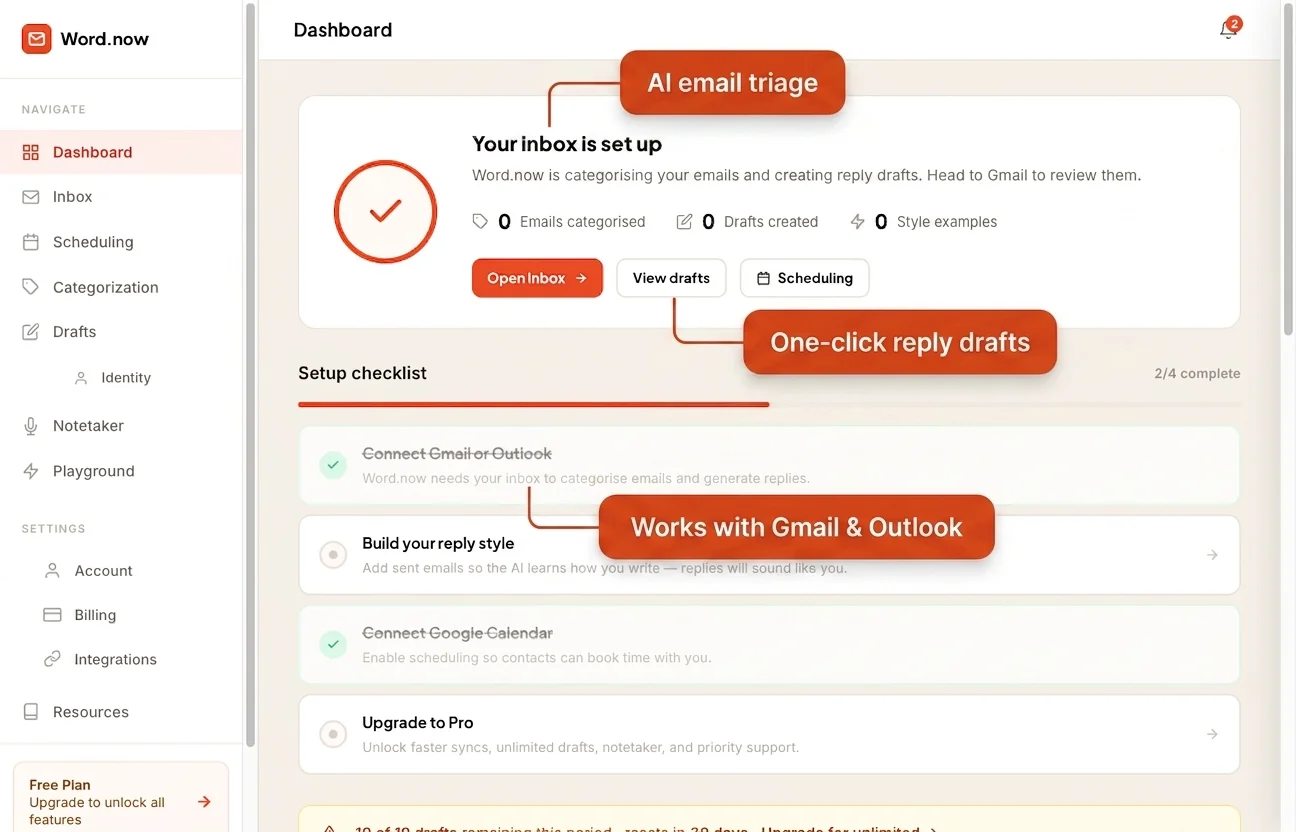
Standalone generators
No inbox access needed - Just describe what you want to say. Useful for one-off drafts or situations where you can't or won't connect your email account.
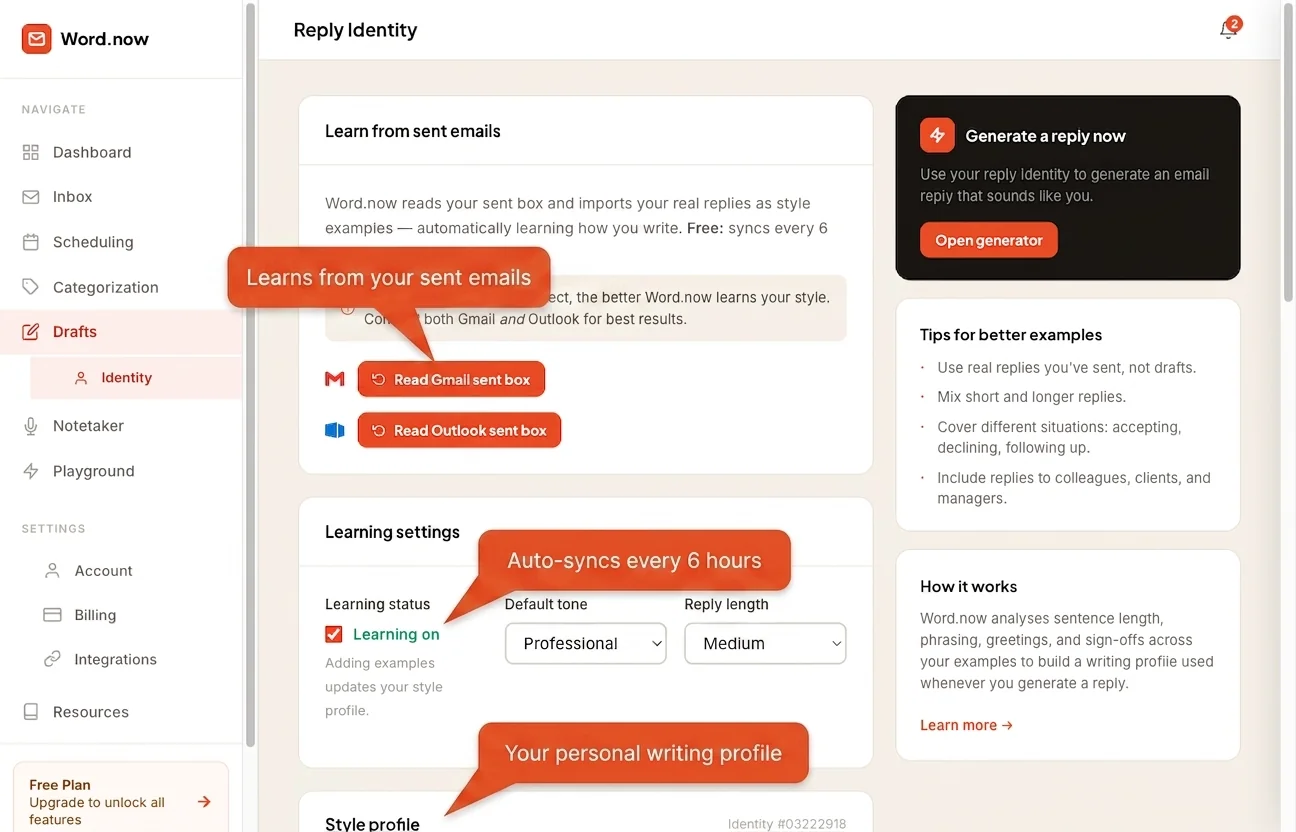
Three types of AI email writer - Which fits your workflow
Most professionals spend between 1 and 3 hours a day writing email. A significant chunk of that time goes to replies you could describe in two sentences but take ten minutes to phrase correctly. You know what you want to say. The effort is in the saying of it - and that is exactly the problem AI email writing tools aim to solve.
The catch is that not all AI email writers work the same way. Generic AI output is detectable. Recipients notice when an email sounds like it was produced by a machine: the phrasing is technically correct but oddly flat, the greeting is too formal, the sign-off is something you would never actually write. The tools that get around this are the ones that learn your actual style rather than defaulting to a corporate-neutral register. This guide walks through the three main types, what to check before using any of them, and how to decide which one makes sense for how you work. See also: Full AI email writer guide or best AI email assistants compared.
The three types of AI email writers
Not every tool that calls itself an AI email writer works the same way. Understanding the three main approaches helps you match the tool to your actual need rather than subscribing to something that solves a different problem.
| Type | How it works | Best for | Privacy risk | Cost tier |
|---|---|---|---|---|
| Generic AI (e.g. ChatGPT, Gemini) | You paste an email in and ask for a reply. The AI has no memory of how you write and no context about your relationships. | Occasional one-off drafts where sounding generic is acceptable | Moderate - you manually paste content, but the text still reaches the model's servers | Free to low |
| Inbox-integrated (e.g. Fyxer) | The tool connects to your Gmail or Outlook account and reads incoming messages to generate suggested replies inline. | High-volume inboxes where speed of response matters more than exact voice match | High - full inbox read access is typically required | Mid ($10-25/mo) |
| Style-learning (e.g. Word.now) | You provide examples of how you actually write. The tool uses those examples to produce drafts in your specific voice rather than a generic professional register. | Anyone who cares that replies sound like them, not like a corporate template | Low to moderate - Word.now's free tool requires no inbox access at all | Free tier available; paid from $8/mo |
Pricing and features change frequently. Verify on each vendor's current pricing page before subscribing.
What makes a generated email reply sound natural
The difference between a reply that sounds like you and one that sounds like AI output is mostly a function of five things. Generic AI gets all five wrong by defaulting to the mean. Style-learning tools get them right because they have seen how you actually handle each one.
- Vocabulary and word choice. People are consistent in the words they reach for. If you never write "please do not hesitate to contact me" but generic AI puts that in every reply, recipients notice immediately.
- Sentence length and rhythm. Some people write long, connected sentences. Others write short punchy ones. Most people vary by context. AI that ignores this pattern sounds off even when the words themselves are correct.
- Greeting style. "Hi", "Hello", "Hey", no greeting at all, first name, full name - these choices are personal and consistent. A reply with the wrong greeting signals instantly that it was not actually written by you.
- Sign-off. "Thanks", "Best", "Cheers", "Regards", initials only - sign-offs are one of the most recognisable signals of authorship. Generic AI defaults to "Best regards" regardless of your actual preference.
- Specificity and detail level. Real people reference specifics from the thread they are replying to. Generic AI produces plausible but vague responses. A natural reply mentions the project name, the meeting date, or the specific question asked.
Generic AI reply vs personalized reply - the same situation
The second version mentions the specific proposal, offers real time options, and matches how a direct communicator actually writes. The difference is not just style - it is whether the reply actually communicates something specific.
When to use an AI email writer vs write it yourself
AI email writing tools are useful for some situations and genuinely wrong for others. The table below is a practical guide. The right answer depends partly on your relationship with the recipient and the stakes involved.
| Situation | Use AI draft | Write manually |
|---|---|---|
| Standard acknowledgement or scheduling reply | Yes - low stakes, high repetition | Only if you prefer to |
| Complaint response from a customer | Yes, as a draft to review and personalize | If you edit the AI draft anyway, fine to start with manual |
| First contact with a new important prospect | Only if the tool knows your style well | Preferred - first impressions rely on authenticity |
| Salary negotiation or promotion discussion | No | Always - stakes too high, relationship too important |
| Declining a request diplomatically | Yes - AI handles polite declining well | If the relationship is sensitive |
| Responding to a legal or compliance matter | No | Always - consult appropriate colleagues, not AI |
| Following up on an unanswered email | Yes - a straightforward task for AI writers | If the context is delicate |
| Thanking someone for a personal favour | No | Always - a real thank you should sound like one |
What to check before using any AI email writing tool
Before connecting an account or entering any email text into a tool, run through these five checks. They take less than ten minutes and help you avoid surprises later. See the full privacy guide: Is AI email safe?
- Read the privacy policy for data retention. Find out whether the tool stores email content, for how long, and whether you can request deletion. Some tools retain content indefinitely unless you explicitly request removal.
- Confirm what inbox access is actually required. Some tools need read-only access to provide context for replies. Others request read-write permission, which means they could send email on your behalf. Know the difference before clicking "Allow".
- Check whether style training is available. If sounding like yourself matters to you, confirm the tool offers a way to provide examples or correct its output over time. Tools without this will default to a generic voice regardless of how long you use them.
- Verify there is a human review step before anything sends. No AI email tool should send on your behalf without you seeing the draft. If the tool offers an "auto-send" mode, disable it until you have used the tool long enough to trust its output reliably. See our guide on how to write better email replies for what "good output" looks like.
- Check whether a free trial exists. Most reputable tools offer a free tier or trial. If a tool requires payment before you can evaluate output quality, that is a sign to be cautious. Test with low-stakes emails before using it for anything important.
How Word.now approaches email writing
Word.now is built around one problem: generated replies that sound like you rather than like AI output. The free email reply generator works without any inbox access. You describe the email you received and what you want to say, and the tool produces a draft. That is the baseline - useful on its own, with zero privacy risk from inbox connection.
For people who want the output to genuinely match their voice, Word.now uses a reply identity system. You save examples of how you actually write - real replies you have sent - and the tool uses those as the reference point for every draft it generates. The more examples you save, the closer the output gets to how you naturally write. There is no automatic scanning of your inbox. You choose which examples to include, and you can edit or remove them at any time. This is a deliberate choice: people who care about their communication style should control what the AI is learning from.
Frequently asked questions about AI email writers
Your emails, drafted.
Starting now.
No inbox access required. Describe what you need to say and get a personalized draft in seconds - Free, forever.